THIS BLOG HAS MOVED. PLEASE UPDATE ANY BOOKMARKS TO GO DIRECTLY TO WWW.RAISINGGEEKS.COM

Sunday, December 26, 2010

December 25th: Stand for the Nexus One

Since I'm in a "what can I make from aluminum" phase, I wanted to try a more complicated stand for the Nexus One that would hold the phone with the charging cable in the bottom.

I liked this design, so I set out to make one.
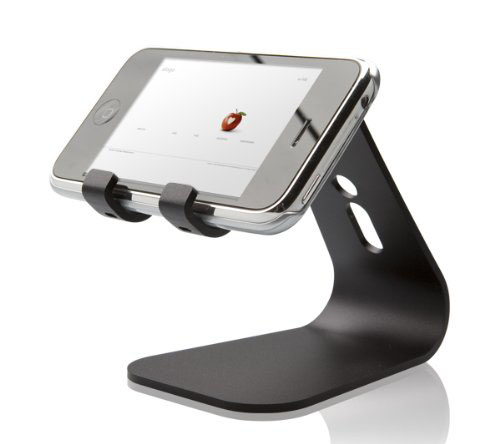

It would have been handy to know the angles - I did a cardboard mockup, and set the angles by my preference. In the end, my stand has the phone much more vertical, I'll try the next one with it kicked back more. This will also allow for shorter "fingers" holding the phone which means less obstruction in portrait mode.


I didn't get the bends straight as you can see here. This is really tough to do properly without proper bending tools. If I build another one, I will be making a center line and perpendicular bend lines _before_ I put on the plastic wrap.

I also bent & unbent the bottom once since I was guessing on the distance. You can see a line about 1/2" from the bottom bend. We will call this one "prototype" :)


The pictures don't show the polish level very well. I was quite happy with the shine :)


And yes, this is my idea of Christmas Day fun :)

December 24th: Lego Stand for the gTablet

A few weeks ago when I purchased the gTablet, I asked my 10 year old to update the Lego stand we built for my G1 when I went to Korea (Lots of movies on a 13 hour flight!)

We googled "Lego iPad stand" and used what we found as the basis for a new stand. Pics below!


It needs slightly larger tires on the front to grip the surface just a bit better and prevent sliding, but overall it works great and fits in the backpack side pockets!

Thursday, December 23, 2010

December 23rd: Making a stand for my Viewsonic gTablet

I've owned an Android 2.2 based Viewsonic gTablet for a few weeks. My 10 year old and I upgraded my Lego phone stand to accommodative the tablet, but I wanted something fancier for everyday use.

I found a few on Amazon, and sure enough, some of the nicer ones are bent aluminum. I have this nice 1/8th inch, 2 foot by 4 foot aluminum sheet in the garage, so a few hours later, I have a tablet stand.

I had to figure out how to do the radius bends without any proper tools. I used a piece of aluminum tube and a hammer :)

Pics of the process and results below. I want the little android guy on it, but I don't have a CNC plasma, and no way I can cut him out by hand and have it look good, so it will be acid-etched or a sticker :>)  I also think I'll making a matching stand for my Nexus One...

4" x 14" aluminum, 1/16" thick, slightly rounded corners. Might be my straightest cuts with the plasma cutter to date...


I protected the metal during the bending with a roll of plastic wrap... it worked well!


Illustration of the bending process

Two pieces of angle to hold the piece, 2 clamps holding the aluminum tube. Its all stuck in the vise...

I spent an hour getting the edges all straight and removing wobble...but it looks good!

Only a few more days of Angry Birds Seasons...

I decided on a rough finish...for now :)

I've got a carbon-fiber vinyl backing I ordered from someone on xda-developers.com

I had to rework the front lip a few times to get the tablet to sit nicely...

I'm sporting a TRON background and the Vegan B3 with Tron-colored slim status bar...

It is quite stable, even in portrait mode...

Why yes, my tablet does have usb, there's even a micro-sd card and a full-sized host usb port under the little plastic cover...

Thanks to the VEGAN-TAB developers - you guys rock :)

Tuesday, October 26, 2010

October 26th: The Snow Cone Monster!

I was sitting at my desk tonight, trying to shake off some mental crud when I got the call for homework help. This typically only happens in extreme circumstances - and usually when something needs to be built.

Sure enough, the 7 year old needed to create a three dimensional monster and bring it to school tomorrow. I was tempted to hit the scrap metal pile & have him build something REALLY cool, but given one evening, that wasn't practical.

He then explains that he wants to build a "Snow Cone Monster". Now I've had some scary desserts, but I've never particularly found Snow Cones threatening. I guess they could give you a cold headache, or stain your face, but not really sure how to make one menacing.

After searching the house for lightweight cone-shaped donor objects and striking out, I went low tech...DUCT TAPE.

In the end, we used Duct Tape, a coat hanger, construction paper, vinyl gloves, newspaper, more duct tape, popsicle sticks, wire ties, even more duct tape, and a little more duct tape.

I present to you, the scariest snow cone alive...and a happy 7 year old :>)


Sunday, October 24, 2010

October 24th - Plasma Cutting + Welding + Arduino = Halloween FUN!


I'd planned to use the plasma cutter to turn a pumpkin into a Jack O' Lantern, and then I saw this video...


So I thought - Plasma Cutting + Welding + Arduino = Halloween FUN!


The old satellite dish provided some great scrap for a bottom plate. I did it freehand since I don't have the circle cutting attachment yet. It came out great - a little grinding and it was almost round :)


The "arms" and "spine" are thin wall tubing from a bakers rack I bought at a garage sale for $10 so I could practice welding small tubing. REALLY easy to blow holes in it with the welder...


I have the Arduino circuit built as per the video above, using the ultrasonic distance sensor from a prior project and one of the Rugged Circuits Gator+ boards. I'm using 2 amber and 2 red LEDs, but it still doesn't seem bright enough. The buzzer seemed pretty anticlimactic in person, so I ditched that part of the circuit for now. The Gator+ board's circuit protection limits the current on output pins, which I suspect is impacting both the brightness AND the buzzer sound level. I didn't want to have to have my standard Arduino floating around in a metal (conductive!) shell, so I stuck with the Gator+ and just used more LEDs.  I might grab a cheap + loud Halloween scare toy this week and then have the Arduino trigger the sound... 


I have velcro on the bottom of the Gator+ boards for mounting them, so I put a companion piece on the inside top of the bucket to hold it in place. I need to do the same for the battery and find a way to mount the ultrasonic sensor so that it can "see" out the eyes or nose.

Tuesday, September 07, 2010

September 6th: Arduino Project in a Day - Helmet Mod

Yesterday the boys & I took some old toys & such to Goodwill. We went into the store hoping to find something metal (and cheap) that we could cut with the plasma cutter :)

We didn't find anything to cut, but I did find some cool stuff, including a keyboard stand (my 7 year old just started keyboard classes) and some powered computer speakers that we will strip for parts to use in Lou's Hockey Scoreboard.

My 10 year old found a cool costume Starfighter helmet for $2 and brought it home. He was wearing it around the house when I noticed that it looked as if it had LEDs across the top of the helmet. I joked that we could put real LEDs in...next thing I know we've got the helmet on the drill press :)

Pics & Video...


Side view - need to clean off that sticker mess..

LEDs in place of the red paint...


Bent the LED cathodes to act as part of common ground...

Used some black wire to tie all the cathodes together...


We were constructing AND watching "The Invincible Iron Man" animated movie on Blu-Ray...
this is a power-on test of all the LEDs


I used my favorite patch cable - Cat5 - to tie the anodes to the Modified "Pico" Arduino which is tucked in the back of the helmet 

Better shot of the Pico Arduino


USB charging kit that uses 4 rechargeable AAs and a retractable mini-usb cable for power.
It even has an on/off switch :)


Blue tape - one of my favorite construction materials...


I used adhesive velcro to hold the Pico in place.